.png)
Tilta Khronos Lite Creator Kit Review: A Practical iPhone 17 Pro Max Filming Setup
Updated: Aug 11
Tilta Khronos Lite Creator Kit Review
I bought the Kit at the beginning of January 2026, shortly after getting my iPhone 17 Pro Max.
Six months later, the case has never come off my phone.
I wanted one everyday case that would protect the phone properly while also making it easier to film reels, behind-the-scenes clips and everyday content for Verosia Studio.
I did not want to carry a bulky mobile filmmaking cage or change cases every time I wanted to shoot something. Most of the content I create for Verosia Studio and client projects is filmed quickly, often on the go rather than in a controlled studio setup.
That is where the Khronos Lite has worked particularly well.
It is not a full professional filmmaking rig. It is a protective everyday phone case that can become a useful filming setup in seconds.
Disclosure: I bought the Tilta Khronos Lite Creator Kit myself. This review is based entirely on my own experience and has not been sponsored or approved by Tilta. I wanted to see whether it could make iPhone filming easier for short-form content, behind-the-scenes clips, product shots and simple client-facing video.

The short verdict
The Tilta Khronos Lite Creator Kit review is best suited to small business owners, social media managers and casual mobile creators who want a compact filming setup that remains practical for everyday use.
Its biggest strength is convenience.
The case protects the phone well, the grip attaches securely, the kickstand is genuinely useful and the filters can be added quickly when needed.
It does not offer the mounting flexibility of a full phone cage, but that is also why it remains small enough to carry every day.
What I bought
My order included the black Khronos Lite Creator Kit for the iPhone 17 Pro Max.
The exact kit contained:
Khronos Lite iPhone 17 Pro Max case
Bluetooth camera control handle
58mm snap-on filter tray
Universal magnetic backplate
Screen protector
58mm variable ND filter
58mm polariser with Black Mist 1/2 filter
I also ordered the optional Khronos 17mm thread lens adapter.
The Creator Kit cost $119. The lens adapter added $9, and international shipping was $35, bringing my full order to $163.
Tilta also included a universal magnetic mounting bracket as a free promotional item. That was part of my order, but it should not be assumed to be included with every Creator Kit.
Prices, bundles and promotions may have changed since I bought mine.
A phone case I can actually use every day
The case may be the most important part of the whole kit.
I have kept it on my iPhone continuously for around six months. It provides enough protection without making an already large phone feel noticeably bulky.
There is a raised lip around the screen, so when the phone is placed face down, the display is not sitting directly against the surface.
The mounting area around the camera also sits slightly above the lenses. When the phone is placed on its back, the lenses are protected rather than resting against the table.
I have only had one or two minor drops, but the case has protected the phone well.
It also feels secure in the hand. A bare iPhone can feel surprisingly slippery, whereas this case adds enough grip to remove some of that anxiety without feeling sticky or rubbery.
The kickstand is more useful than I expected
The case has a small fold-out kickstand that works in portrait and landscape.
I originally saw it as a content-creation feature, but I now use it in ordinary situations too:
Video calls
Watching videos while travelling
Following recipes in the kitchen
Keeping the phone upright on my desk
Using the iPhone landscape charging display
Reviewing photographs and footage
I sometimes open it slightly and place my little finger through it for extra security while holding the phone.
It is not designed as a finger grip and is not especially comfortable for long periods, but it can provide a little extra reassurance.
How secure is the camera grip?
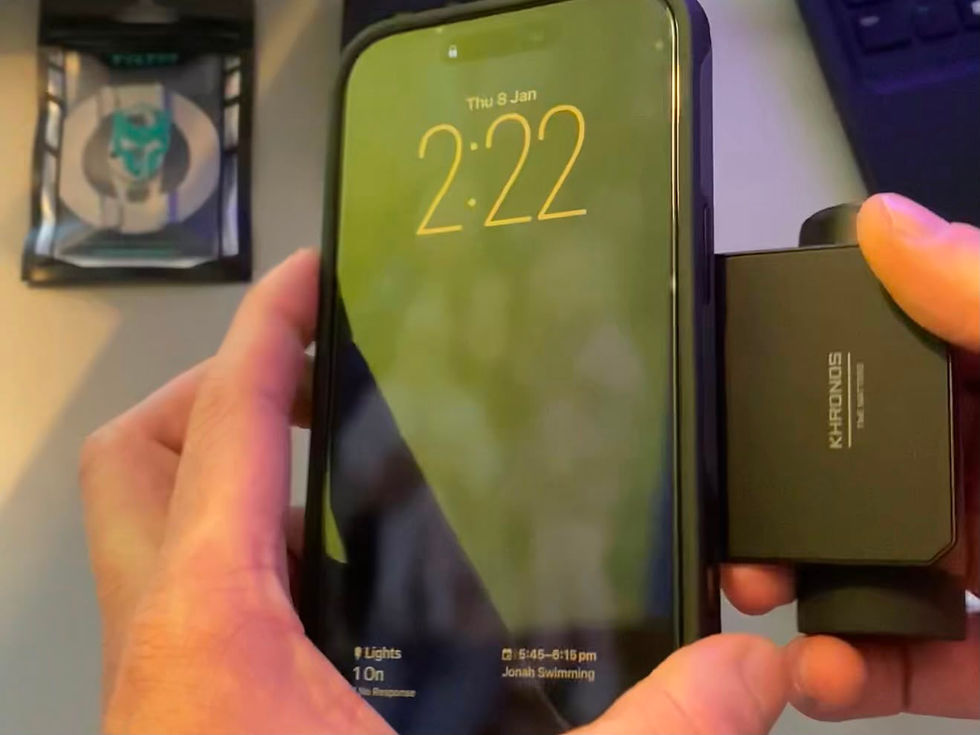
The control handle attaches quickly and feels extremely secure.
I can shake the phone firmly without worrying that the grip will detach.
It can be rotated for portrait or landscape filming, and it makes the phone feel more like a compact camera than a bare smartphone.
The physical shutter button is particularly useful when filming one-handed or trying to keep the phone steady.
There is one limitation when shooting vertically.
Because the iPhone’s ultra-wide camera captures such a wide field of view, part of my hand can occasionally appear at the edge of the frame.
I normally avoid this by rotating the handle slightly or adjusting my grip. It is a small compromise rather than a major problem, and it is likely to affect other compact phone grips positioned close to the camera lenses.

Using the grip with Blackmagic Camera
The grip’s controls work well with the Blackmagic Camera app.
I have tested the focus, zoom, shutter and recording functions, and they have all worked as expected.
Blackmagic Camera provides much deeper control over settings such as frame rate, shutter speed, white balance and ISO than the normal iPhone camera.
However, I use Apple’s standard Camera app more often than I expected.
Most of the content I capture is spontaneous. I want to take the phone out, open the camera and record immediately.
The Blackmagic app is more useful when I have time to set up a deliberate shot. The controls work well, but they have not become part of every video I make.
That is worth considering if the control wheel is the main reason you are thinking about buying the kit.
Are the filters useful?
The included filter system is simple to attach.
The tray lines up with the mounting points around the phone’s camera and snaps securely into place. The filters then connect magnetically.
Neither the tray nor the filters have ever felt loose during normal use.
Variable ND filter
The variable ND filter reduces the amount of light reaching the camera.
This is useful when filming in bright conditions, particularly when you want more control over exposure and shutter speed rather than allowing the phone to compensate automatically.
I have used it most often in strong sunlight and outdoor situations where the highlights would otherwise feel harsh.
Polariser with Black Mist 1/2
The polarising part of the second filter helps control glare and selected reflections from surfaces such as water and glass.
The Black Mist effect gives footage a softer and slightly more nostalgic appearance. It takes some of the sharp digital edge away from smartphone footage and creates a more atmospheric finish.
I use this filter more selectively.
When I am unsure how a photograph or video will eventually be used, I often prefer to capture a neutral image and apply the final filters or colour treatment during editing.

The small frustration: no filter cap
The main addition I would like to see is a protective cap for the filters.
The grip and case are compact enough to remain attached when I place the phone in a pocket.
I would not do that with an exposed filter attached because I would be concerned about scratching it.
Instead, I remove the filter and return it to the small protective case it arrived in. That keeps it safe, but it means carrying another item and adds a few extra steps before filming.
A simple snap-on cap would make it easier to leave the filter attached and keep the phone ready to shoot.
It is a minor frustration, but when the appeal of the kit is speed and convenience, every extra step matters.
Where the kit has limits
The Khronos Lite is deliberately more compact than a full phone cage.
That makes it excellent for everyday use, but less suitable for someone who regularly needs to attach:
External monitors
Several microphones
Large lights
External storage drives
Multiple handles
Several mounting accessories
There is a threaded mounting point for a tripod or stand, but this is still a simple point-and-shoot setup rather than a full production cage.
I use a Hollyland Lark M2 microphone with mine.
Because I own the camera version rather than the direct USB-C phone version, its receiver needs somewhere to clip. I sometimes attach it to the opened kickstand.
It works, but a proper cage would provide a more deliberate mounting solution.
Who is the Tilta Khronos Lite Creator Kit for?
I think the kit makes the most sense for:
Small business owners filming their own social content
Founders documenting their work
Social media managers
Casual mobile filmmakers
Creators who want something compact and portable
Anyone who wants more stability without carrying a large rig
It may be less suitable for a professional filmmaker building a complete commercial mobile-production setup.
For that type of work, a full cage with more mounting options will probably be the better choice.
The Khronos Lite is for someone who wants to take a phone out of a pocket and start recording with very little setup.
Is it worth the money?
For my needs, yes.
I probably use the filters less than I originally expected because the iPhone 17 Pro Max camera is already extremely capable.
I have also not invested in additional lenses yet, despite buying the 17mm adapter.
The features I use most are simpler:
The protective case
The secure camera grip
The physical shutter button
The built-in kickstand
The option to add a filter when it is useful
That is also why the kit feels like good value.
Protective phone cases can already be expensive. This package gave me an everyday case, screen protector, grip, kickstand and filter system in one setup.
Final verdict
The Tilta Khronos Lite Creator Kit does not replace a full filmmaking cage, and it does not need to.
Its real strength is that it removes friction.
The case can stay on the phone every day. The grip attaches in seconds. The filters are available when needed, and the kickstand quietly becomes useful in far more situations than expected.
For small business owners and casual creators who want a practical iPhone 17 Pro Max filming setup without carrying a bag full of equipment, it strikes a strong balance between protection, control and portability.
Creating useful content should not require an unnecessarily complicated production setup.
Verosia Studio helps small businesses plan, create and improve digital content that makes their work easier to find, understand and trust.
Comments